Know where every dollar of cash is — from the register to your hand.
Square tells you what was in the drawer. Retail Opr tells you what happened after: the envelope, the count, the handover, the deposit — across every store you own.
Running every day across three brands and ten locations, plus our first outside chain.
The gap nobody fills
Every tool you already pay for answers a question next to this one. None of them answers the question in the middle: did the money in the envelope actually reach you?
Square says $742.16 in cash. The envelope had $700. Who is short — and does anyone know tonight?
Your manager collected six envelopes on Friday. When exactly did that money reach you?
A store has been $3–$8 light every day for a month. Would you notice $180?
The deposit slip says $4,200. Which days is that, exactly?
One day, five steps
No new hardware, no new habits for your staff. The change is what happens after they close.
Close the register
Staff count the bills and fill in the envelope exactly the way they do today. Nothing about their evening changes.
Photograph it
From the store iPad or their own phone — you decide which is allowed.
The math runs
The handwriting is read automatically and checked against Square's own cash total for that store and day.
Anyone short hears tonight
A text names the associate on the envelope and shows the full calculation. They write back what happened.
Handover and deposit
Two-party count, a deposit with a photo of the bank receipt, then the month locks.
It reads handwriting. It never does the math.
The photo of the envelope is turned into fields: store, date, associate, hours, cash, envelope, expenses, balance. Every figure carries a confidence score, and a manager approves before anything counts.
- The arithmetic is done in code, against Square's cash total — not by the model.
- A field it cannot read comes back empty. It is never filled with a guess.
- The business date is always the date the person picked, never the date in the photo.
- If sales cannot be read at all, the day stays uncompared and says so. No figure is invented.
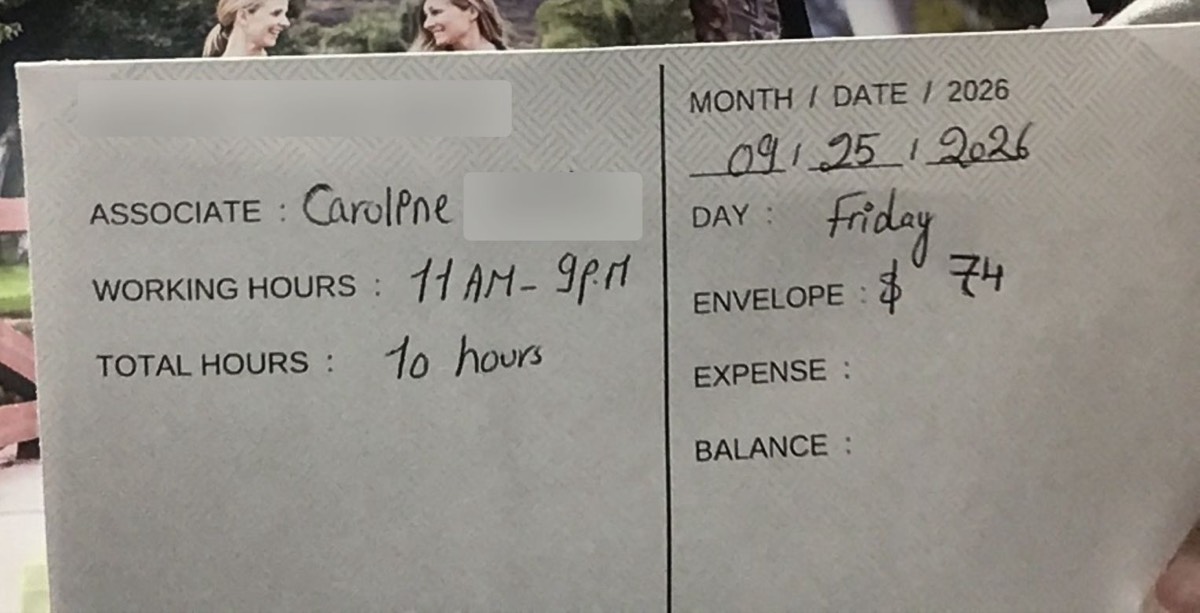
- Business date
- 2026-09-25 (Friday)
- Associate
- Caroline
- Working hours
- 11:00 – 21:00 · 10 hours
- Envelope
- $74.00
- Store
- — covered for this page
- Expense
- — left blank on the envelope
- Balance
- — left blank on the envelope
Blank stays blank. The arithmetic runs in code against Square's cash total — the model never fills in a number it could not read.
The math is in the open
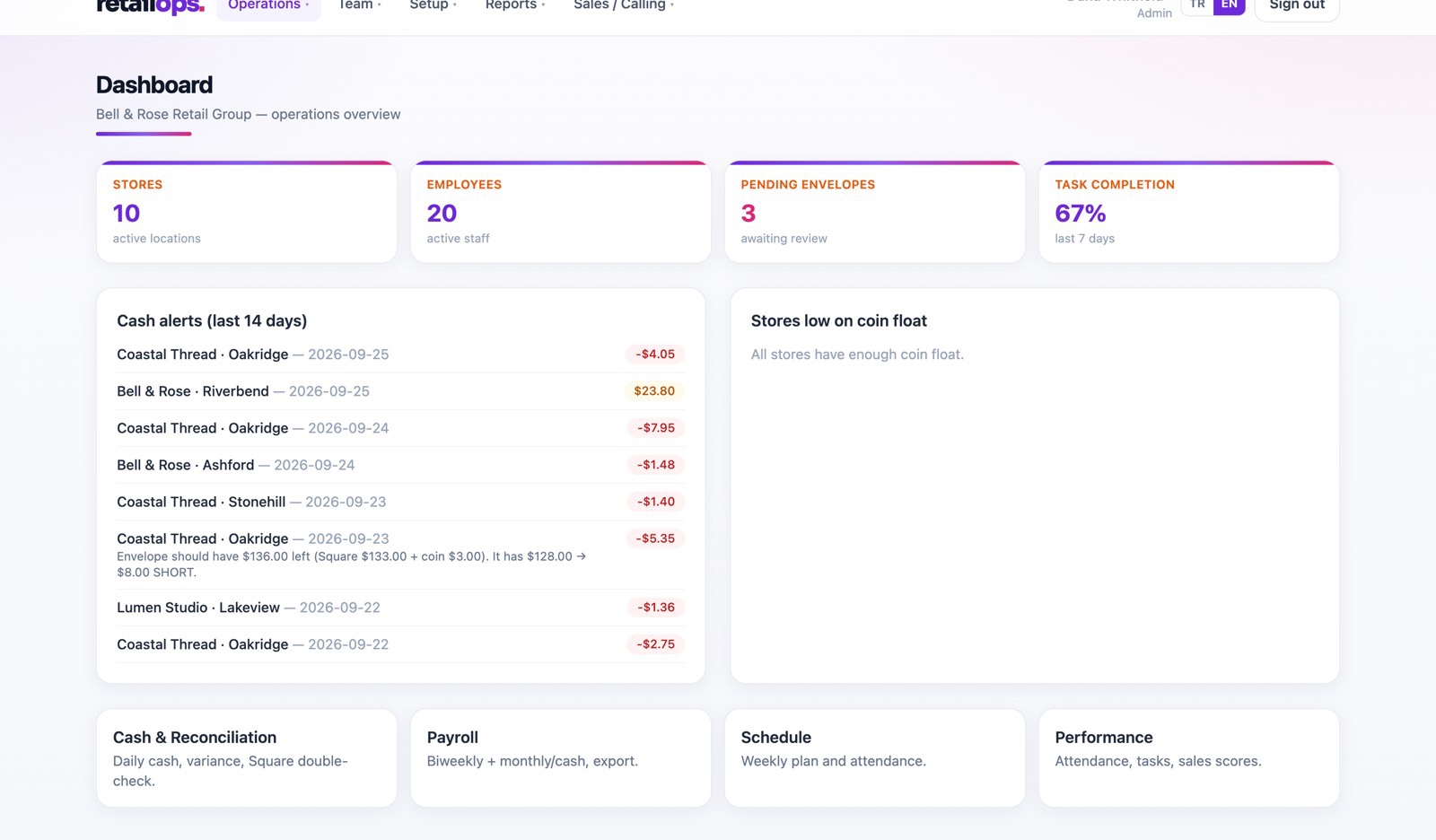
Coins come out of the float and bills pile up, so the envelope should hold more than Square's cash figure. The difference is the number that matters.
- Coin change uses Square's real coin figure when we have it, otherwise transactions × 30¢.
- SHORT fires at the store's own threshold — a dollar by default. OVER fires above $20: money that should not be there is a signal too.
- A coin float below its minimum and an opening float that does not match each raise their own flag.
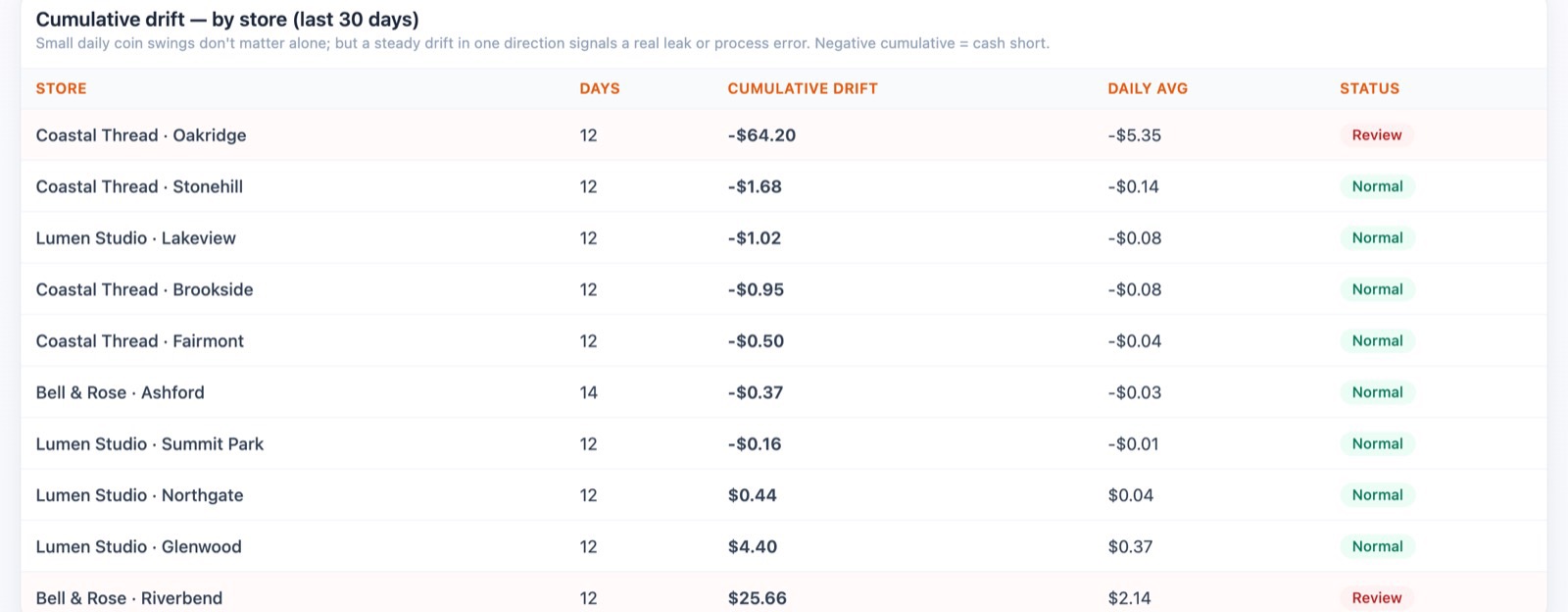
- Thirty-day cumulative drift catches the store that is quietly a few dollars light every single day.
These calculations are unit-tested, and the screens, the alerts, the reports and the answers all run the same ones. There is one calculation in this product, not four.
One short day is noise. The same store, short every day, is a pattern.
| Store | Cumulative | Daily avg | Status |
|---|---|---|---|
| Coastal Thread · Oakridge | −$64.20 | −$5.35 | Review |
| Coastal Thread · Stonehill | −$1.68 | −$0.14 | Normal |
| Lumen Studio · Lakeview | −$1.02 | −$0.08 | Normal |
| Bell & Rose · Riverbend | +$25.66 | +$2.14 | Review |
Cash has a chain of custody, not a monthly total
Every step is a two-party event with a name attached. If money goes missing between two of them, the shortfall stays on that manager's balance until it is settled — it does not dissolve into an end-of-month number.
- EnvelopeCounted and photographed at close
- CollectedCounted again when it reaches the office
- HandoverTwo people count together, optional witness
- DepositBank receipt photo required
- Month lockedNothing can be edited after the lock
The rest of the day, in the same place
Cash is the reason owners come to us. It is not the only thing they stop doing by hand.
Shifts and clock-in
Clock-in works only on the store's own iPad, bound to it by a single-use pairing code and a signed device cookie. Optional GPS radius, 200 m by default. One tablet can cover several units in the same mall.
Tasks with photo proof
Recurring checklists per store. The proof photo is pre-screened — does this picture actually show the task done — and then a manager approves or rejects it.
Payroll
Weekly, biweekly, semi-monthly or monthly. Hourly, daily or monthly cash. Commission, manager fees, transport, bonuses, deductions, dated wage history, W2/W9 split with a per-period cap, advances that carry over, CSV export.
Performance
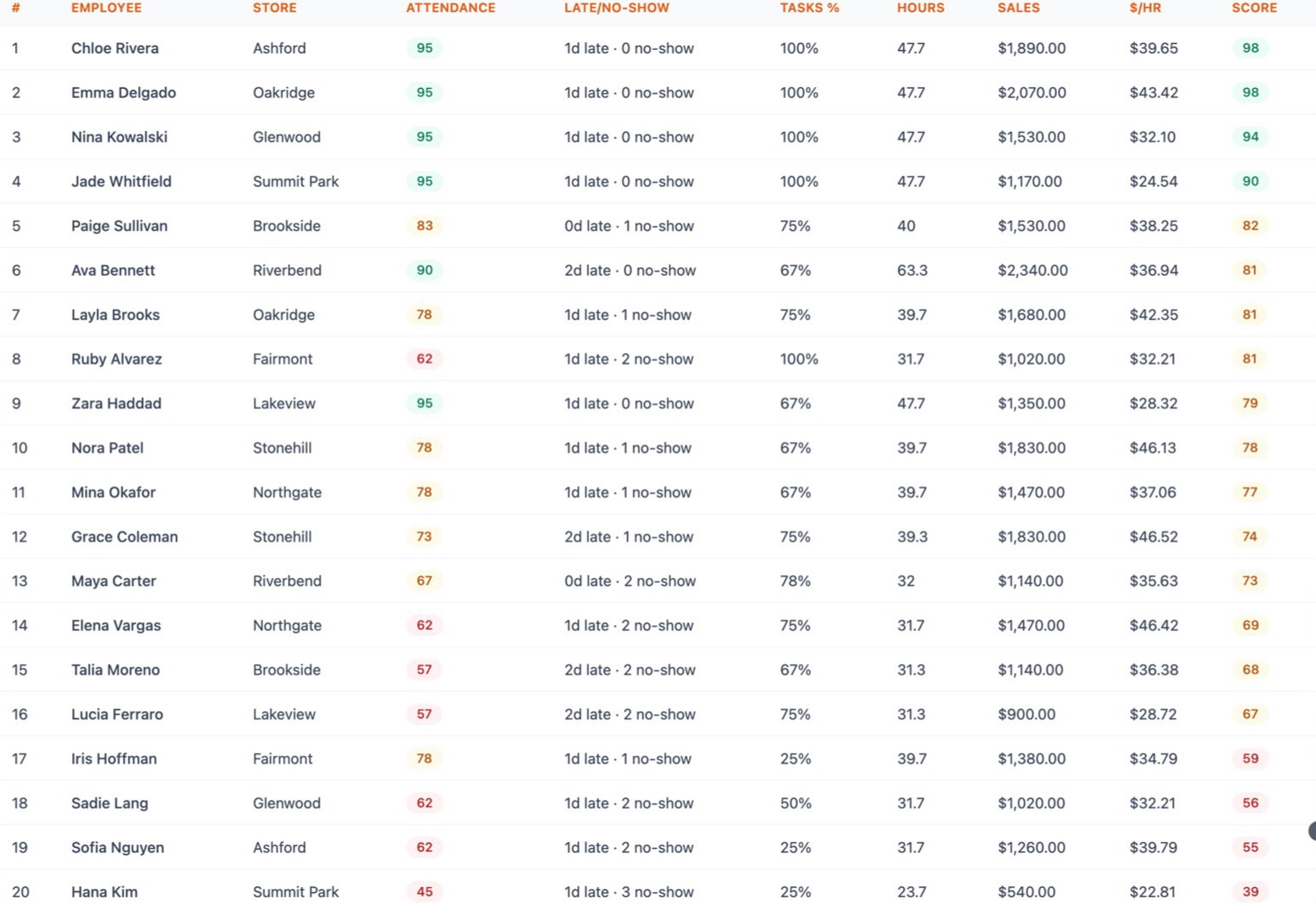
Rolling 14 days: attendance, task completion and sales per labor hour in one score. Covering someone else's shift never counts against you.
Reports
Twelve built-in reports — the same numbers on screen, in Excel, in PDF and in the scheduled email. Hourly, daily, weekly or monthly, or only while your stores are open.
Ask
Type a question about your own stores in plain English. It reads, it never writes, and it will say it does not know rather than invent a number.
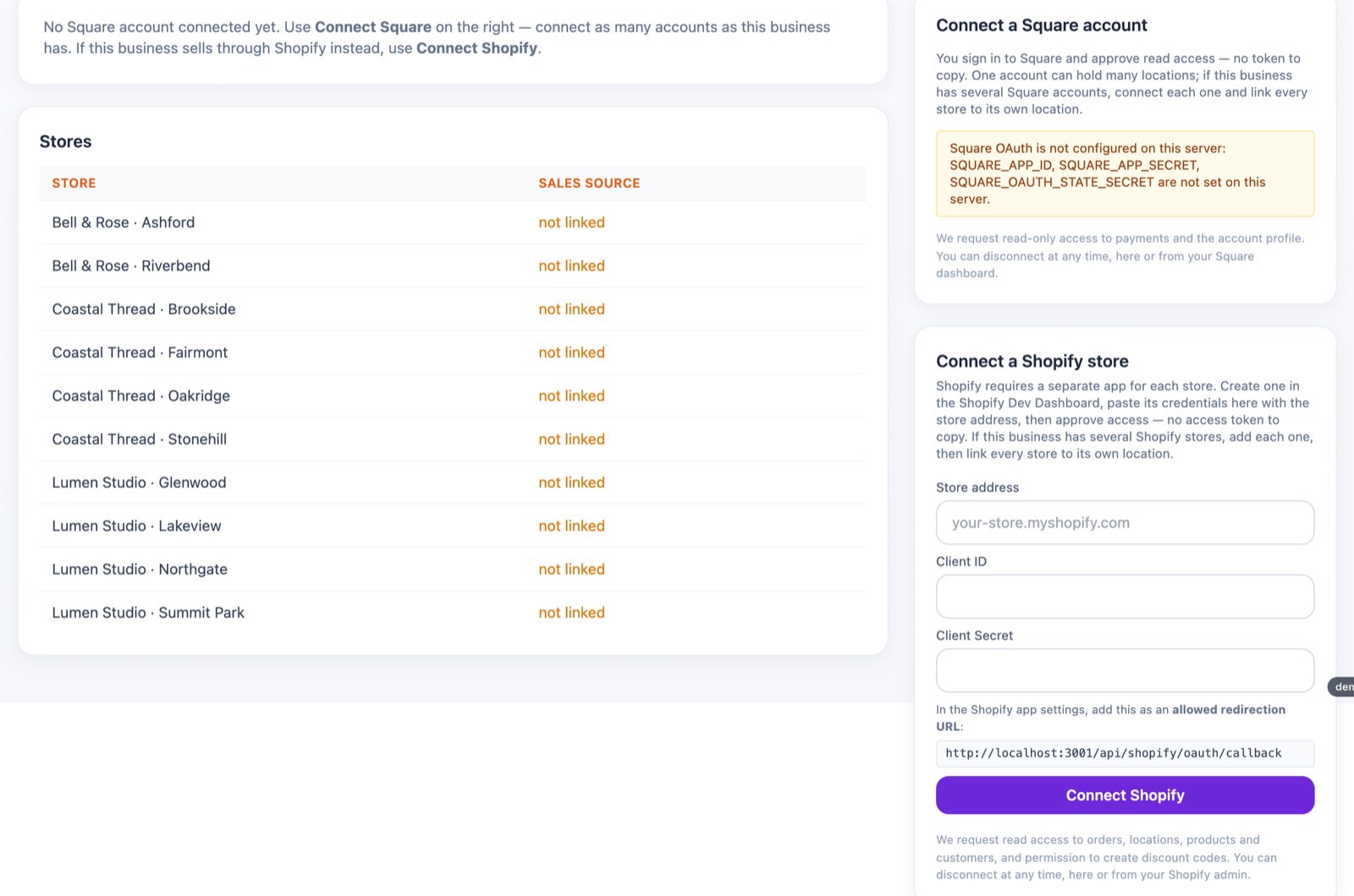
Connect Square in a couple of minutes
You sign in to Square and approve read access — there is no token to copy and no location ID to paste. Your locations are listed live and you pick which store is which.
- Several Square accounts under one company are normal here — each store binds to its own account and location.
- Shopify connects the same way, with your own app credentials per shop.
- Historical days are backfilled, so your first week already has a month of history behind it.
- Clover is on the roadmap and is not built yet. Without a connected POS you can type the day's cash in, and everything else still works.
What we do carefully, and what we have not built
How the money is handled
- Every amount is stored in whole cents. No floating point, anywhere.
- Every create, update and delete is written to an audit trail automatically — not by remembering to log it.
- Integration secrets are encrypted at rest; employee documents live in private storage with short-lived links.
How access is handled
- Your company gets its own database — isolation by design, not a column in a shared table.
- Roles for owner, admin, manager, staff and store tablet, with strict area scoping so a manager sees only their stores.
- A read-only “view as employee” mode, so you can see exactly what your staff see.
Not built yet — so you hear it from us first
- No self-service signup — we set your account up with you.
- No card billing yet: we invoice.
- No public sandbox; demos are a screen share with your own numbers.
- No Clover connector, no overtime multiplier, and no tax calculation — payroll is gross and for your records.
Pricing
A fifteen-store chain is $585 a month. One month of cash quietly walking out of one store usually costs more than that.
Draft pricing while we are still onboarding by hand. Nothing is charged before we have spoken, setup is done with you — we load your stores, connect Square and import your team — and you start live on one store.
Questions owners ask
Do we need new hardware?
No. An iPad in the store is enough, and staff can use their own phone if you allow it. Nothing is installed on a register.
Our handwriting is bad. Does that break it?
It reads most envelopes as written. When a field is unclear it leaves it empty and asks the person to type that one number — it never fills in a guess.
We are not on Square. Can we still use it?
Yes, with the day's cash entered by hand. Shopify connects the same way as Square, and Clover is on the roadmap.
Can a manager see other stores?
Only if you let them. Strict area control limits every screen, report and export to the stores they are assigned to.
Do you calculate payroll taxes?
No. Payroll produces gross pay and records for your accountant. We do not withhold or file anything.
Where is our data?
In its own database for your company, on our servers in the US. Reports export to Excel, PDF and CSV at any time — the data is yours.
Can I try it myself first?
There is no public sandbox yet. A demo is a short screen share, and we can walk through your own last week of envelopes.
How long does setup take?
Usually a day or two: we load your stores and staff, connect Square, pair the tablets, and start with one store.
See it on your own numbers
Twenty minutes, your last week of envelopes, and an honest answer about whether this fits you.
- We reply within one business day.Usually the same day.
- A short screen share.We walk your own cash week and show where the gaps are.
- If it fits, you go live on one store.We load your stores and staff, connect Square, and pair the tablet.
We will also tell you if you are too small or too large for this today.
Already a customer?
This page is not your workspace. Store tablets and staff sign in at yourcompany.retailopr.com. Type your company name and we will take you there.
Opens company.retailopr.com/setup
Find out what your stores are missing.
Most owners find their first real gap in the first two weeks — usually one store, a few dollars a day.